| POWER SUPPLY |
| CONNECTIONS |
| POWERING UP |
| Read this section before you start using the S03! ~ |
This section explains how to connect your S03 synthesiser to an AC power source, audio and midi devices and a computer system. Only switch the S03 on after you have made all the necessary connections.
1. Make sure that the [STANDBY/ON] switch is at the standby position.
2. Connect the PA-3B’s DC plug to the DC IN terminal on the S03’s rear panel.
3. Connect the adapter’s AC plug to an electrical outlet.
| Do not attempt to use an AC adapter other than the Yamaha PA-3B! ~ |
Connecting to external audio equipment.
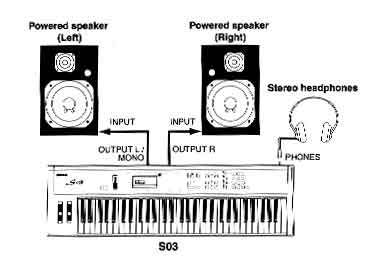
Since the S03 has no built-in speakers, you need to monitor its sound output via external audio equipment. Alternatively you can use a pair of headphones. There are several methods of connecting to external audio equipment as described in the following illustration.
Connecting stereo powered speakers.
A pair of powered speakers can accurately produce the S03’s rich sound with their own pan and effect settings. Connect your powered speakers to the OUTPUT L/MONO and R jacks on the rear panel.
Connecting to a mixer.
If you want to integrate the S03 into a larger system with other instruments and additional audio processing capabilities, connect it to a mixer, amplifier and stereo monitor systems as shown below.
Connecting controllers.
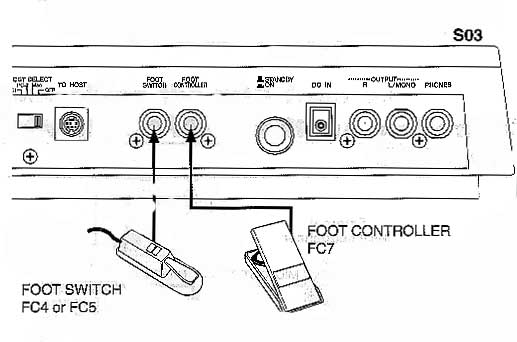
The S03 has controller jacks on the rear panel, including foot switch and foot controller. You can connect optional controllers, such as foot switch and foot controller to control tone, volume, pitch and other parameters.
Power on procedure.
When you have made all the necessary connections between your S03 and any other devices, make sure that all volume settings are turned down all the way to zero. Then turn on every device in your setup in the order of midi masters (senders), midi slaves (receivers), the audio equipment. This ensures smooth midi operation and prevents speaker damage.
When powering down the setup, first turn down volume for each audio device. Then switch off each device in the reverse order.
Turning on the S03.
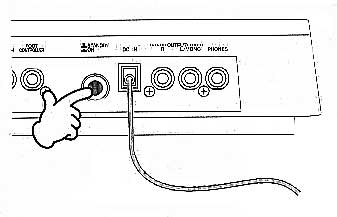
1. Press the [STANDBY/ON] switch.
2. A splash screen is displayed briefly (“welcome to S03”).
3. The MULTI or VOICE play mode screen appears next.
4. Turn up the amplifiers volume as necessary.
5. Adjust the S03’s [VOLUME] slider to set an appropriate volume level.