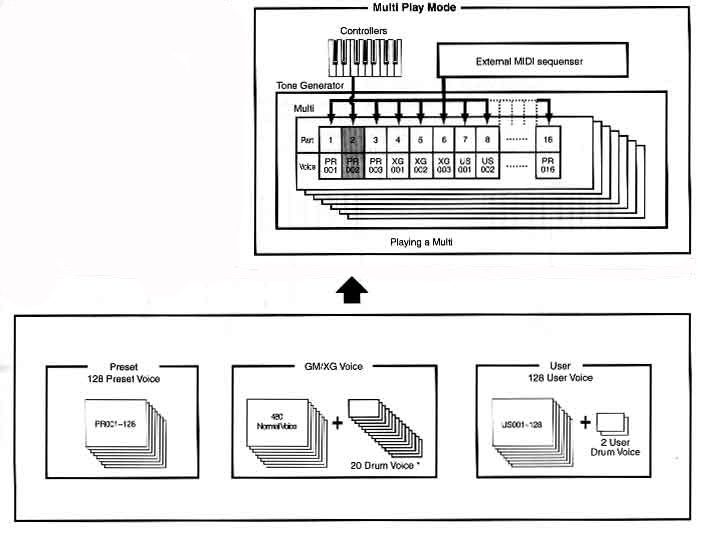
| PLAYING IN MULTI MODE |
| EDITING MULTI |
Multi means assigning different voices to different parts of the keyboard. Multi consists of up to 16 parts, each of which can play a normal voice or a drum voice part. You can set up layers of different voices or special key splits in which your right and left hand can play separate voices.
1. Press the MULTI button. Led will light and you can play the multi via keyboard. Up to 32 multis can be stored in the user memory.
2. Select a multi number.
- Select with the INC/YES and DEC/NO buttons. Press enter to specify the multi. INC/YES increases and DEC/NO decreases the numbers.
- Select with the numeric keypad and ENTER button. Specify the multi with numeric keypad. Press ENTER. (It is not necessary to enter all three digits.)
Test the selected multi by playing the keyboard. Change voices by following the previous procedure.
You can set up voices to play a string voice in the lower range and the piano voice in the upper range for example by following the instructions below.
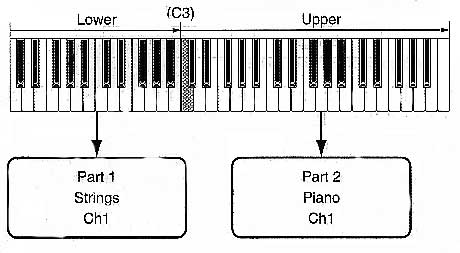
1. Press [MULTI] button followed by [EDIT] button to enter the MULTI edit mode (each led will light). Press + or – buttons to select the part edit display. This divides the keyboard into two separate sections, both of which can be assigned a different voice.
2. Select a part for the lower range by using the part [+] and [–] buttons.
3. Use the [s] and [t] buttons and call up the voice selection screen.
4. Set voice for the lower range part. Use the [s] and [t] buttons to call up the volume screen.
5. Use the [s] and [t] buttons to call up the note limit screen and specify a key range for the lower and upper parts. Select C2 for the lowest note and B2 for the highest.
6. Follow the procedure from 2-5 to set a voice for the upper range part.
7. Before exiting the MULTI edit mode, store the above setting to a MULTI. See MULTI store below.
1. Press store button and the multi store screen appears.
2. Use DEC/NO and INC/YES buttons to select the number under which you want to save your multi.
3. When you press the ENTER button you will be asked for confirmation. Press the INC/YES button to confirm. “COMPLETED” message appears and operation returns to the multi play mode.