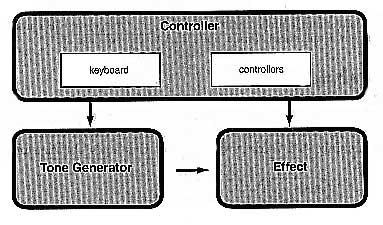
| CONTROLLER |
| TONE GENERATOR |
| EFFECTS |
| ABOUT THE MODES |
The S03 has a wide variety of advanced and convenient features. This section gives you an overview of these features. The following diagram shows the various component sections or “blocks” of the S03.
This block consists of the keyboard, pitch bend, and modulation wheel and so on. The keyboard itself does not generate sounds but instead sends note, velocity and other information to the S03’s tone generator section for the note you play. The controllers also send non-note performance data. Information from the keyboard and controllers can be transmitted to other external midi devices through the MIDI OUT connector.
This block plays back sounds according to information received from keyboard and controllers. The following example illustrates the path taken by the signal from an element in the VOICE mode.
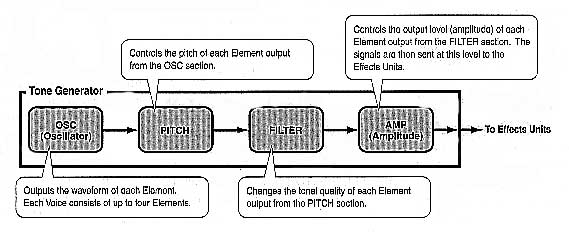
About the tone generator
The tone generator of the S03 utilises the sophisticated AWM2 system. AWM2 (Advanced Wave Memory 2) is a synthesis system based on the use of sampled waveforms and is used in many yamaha synthesisers. For extra realism, each AWM2 voice uses multiple samples of real instrument’s waveform. Furthermore, a wide variety of envelope generator, filter, modulation and other parameters can be applied to the basic waveform.
Maximum polyphony
The maximum polyphony of the S03 is 64 notes. However, the actual note polyphony will vary depending on the number of voice elements. To calculate the actual polyphony, divide the total polyphony of 64 by the number of elements in the voice. For instance, if a voice consists of 2 elements, the maximum note polyphony for the voice is 32.
The effects can be used to change or enhance the sound of a MULTI or a VOICE. These include the effects of the reverb section (11 types) for adding ambient aftertones to the sounds, the chorus section (11 types) that add animation and depth and the variation section (42 types) which features a large number of additional effects.
| MULTI MODE |
| VOICE MODE |
| DEMO MODE |
| UTILITY MODE |
| STORE MODE |
| DEPECHE MODE |
The S03 has various modes, each covering a different set of operations and functions.
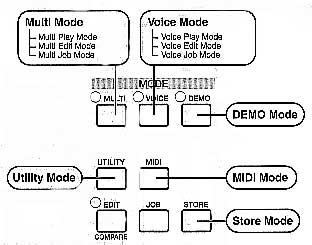
Multi play mode
Select this mode when you want to use the S03 as a multi-timbral tone generator. In this mode, you can use an external midi sequencer to play several different instrument parts simultaneously. This mode can also be used combine several different voices together in a layer
Multi edit mode
In this mode, you can edit and create MULTIs. You can save up to 32 MULTIs to internal memory.
Multi job mode
In this mode you can copy and initialise MULTIs and perform other similar operations (jobs).
Voice play mode
Normal VOICEs and drum voices can be played in this mode. You can select from the preset voices (128 normal voices), user voices (128 normal voices + 2 drum kits) and XG voices (480 normal voices + 20 drum kits). The S03 also features a category search function that lets you quickly select a voice according to its instrument type.
Voice edit mode
Normal voices and drum voices can created and edited in this mode. You can save up to 128 edited normal voices and 2 edited drum kits as user voices in user memory.
Voice job mode
In this mode, you can copy elements and initialise voices and perform other similar operations (jobs).
In this mode, you can play the demo songs contained in internal memory. The various demo songs play back continuously.
This mode contains global settings related to the entire system of the S03 such as master tuning, controller-related settings.
In this mode, you can make midi-related settings such as the midi transmit/receive channels and device number.
In this mode, you can store your original VOICEs and MULTIs to internal memory.