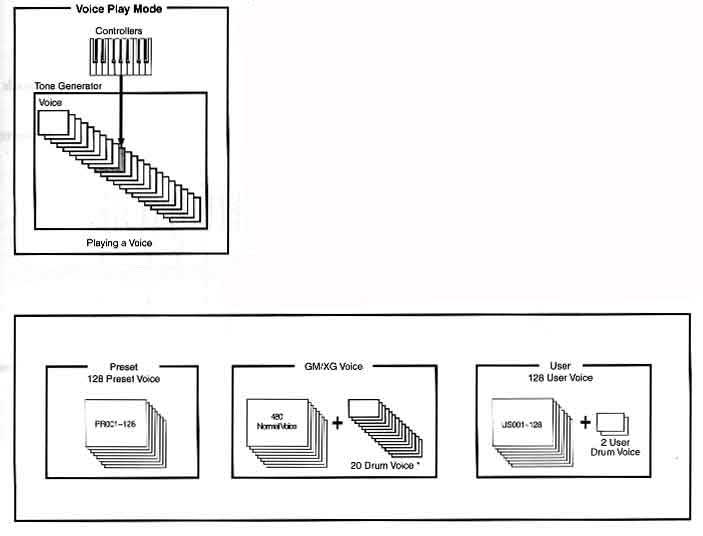
In the voice play mode you select and play any of the voices created by using the elements and setting various parameters. Voices are stored in the internal memory (preset, user, GM/XG).
· Press the VOICE button to enter the voice play mode. Play the voice from the keyboard.
· Press MEMORY button to select voice memory. There are three memory sections for the normal voices (preset, user, GM/XG). The various voices are assigned to each memory section as shown above.
· Select a voice number.
- Select with the INC/YES and DEC/NO buttons. Press enter to specify the voice memory(preset, user, GM/XG). INC/YES increases and DEC/NO decreases the numbers.
- Select with the numeric keypad and ENTER button. Specify the voice number with numeric keypad. Press ENTER. (It is not necessary to enter all three digits.)
Test the selected voice by playing the keyboard. Change voices by following the previous procedure.
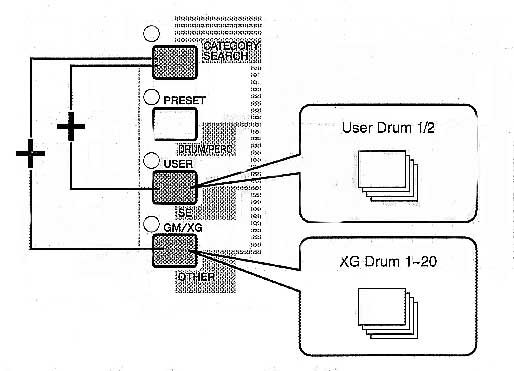
The drum voices are stored in separate areas of the USER and GM/XG memory section. To call up the USER drum memory, press the [USER] button while holding down the [DRUM] button. To call up the GM/XG drum memory and to call up the XG SFK Kit memory, press [GM/XG] button while holding down the [DRUM] button.
Using Voice Category Search
Press the CATEGORY SEARCH button in Voice Mode. Its led will light. Use memory buttons and the numeric keypad for selecting categories. The first voice in the category will be automatically selected. Then press exit to switch off/disable category search.
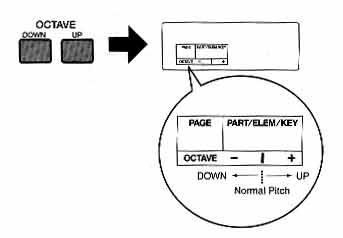
Use the OCTAVE UP button to raise the range by an octave and the OCTAVE DOWN button to lower it by an octave. You can shift the note range by up to three octaves in either direction. To return to the standard octave range, press both buttons at the same time.